Best Free Parent Control App For Screen Mirror, Camera Access And Content Filter – Ximos
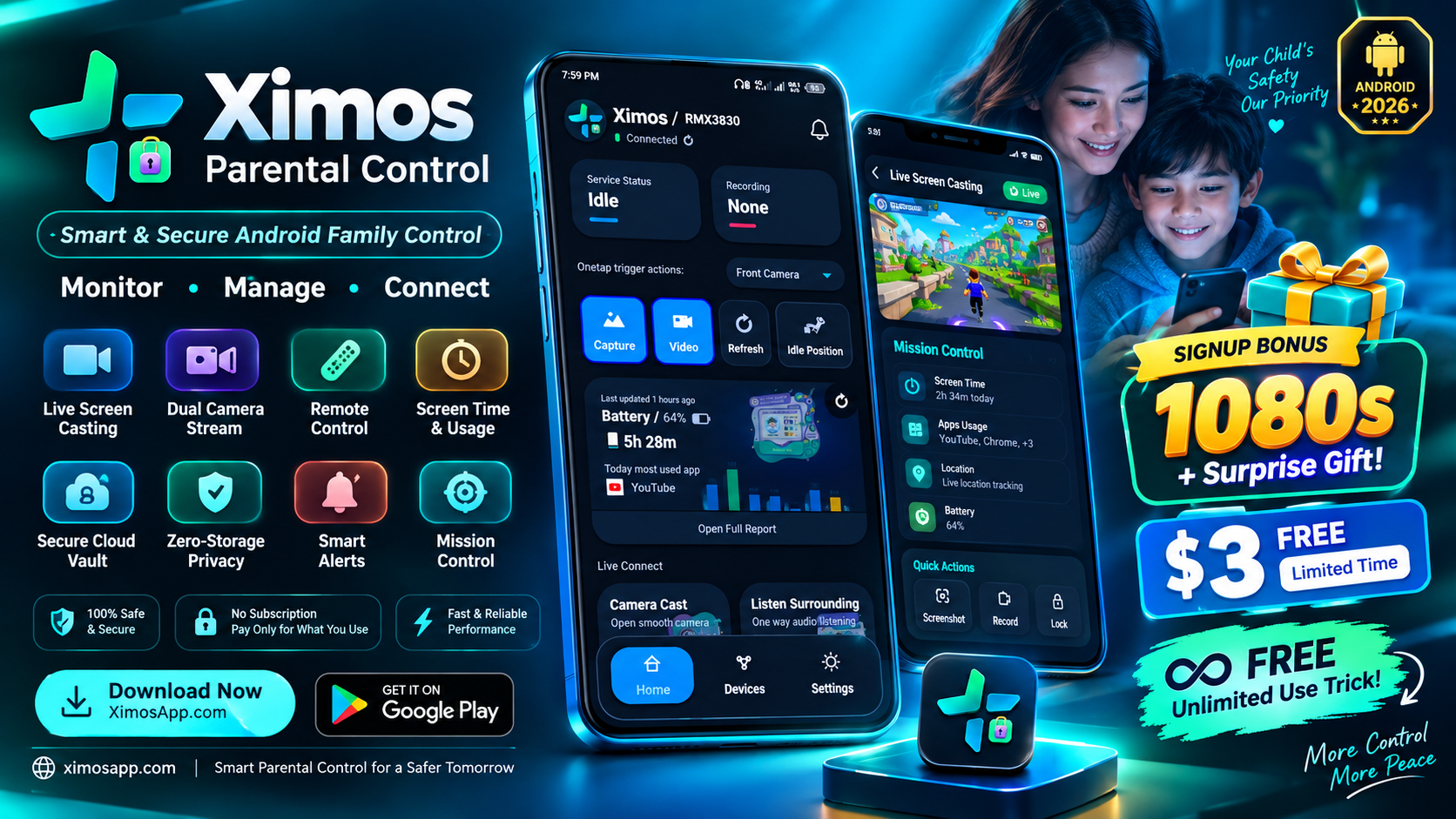
Best Free Parent Control App For Screen Mirror, Camera Access And Content Filter – Ximos
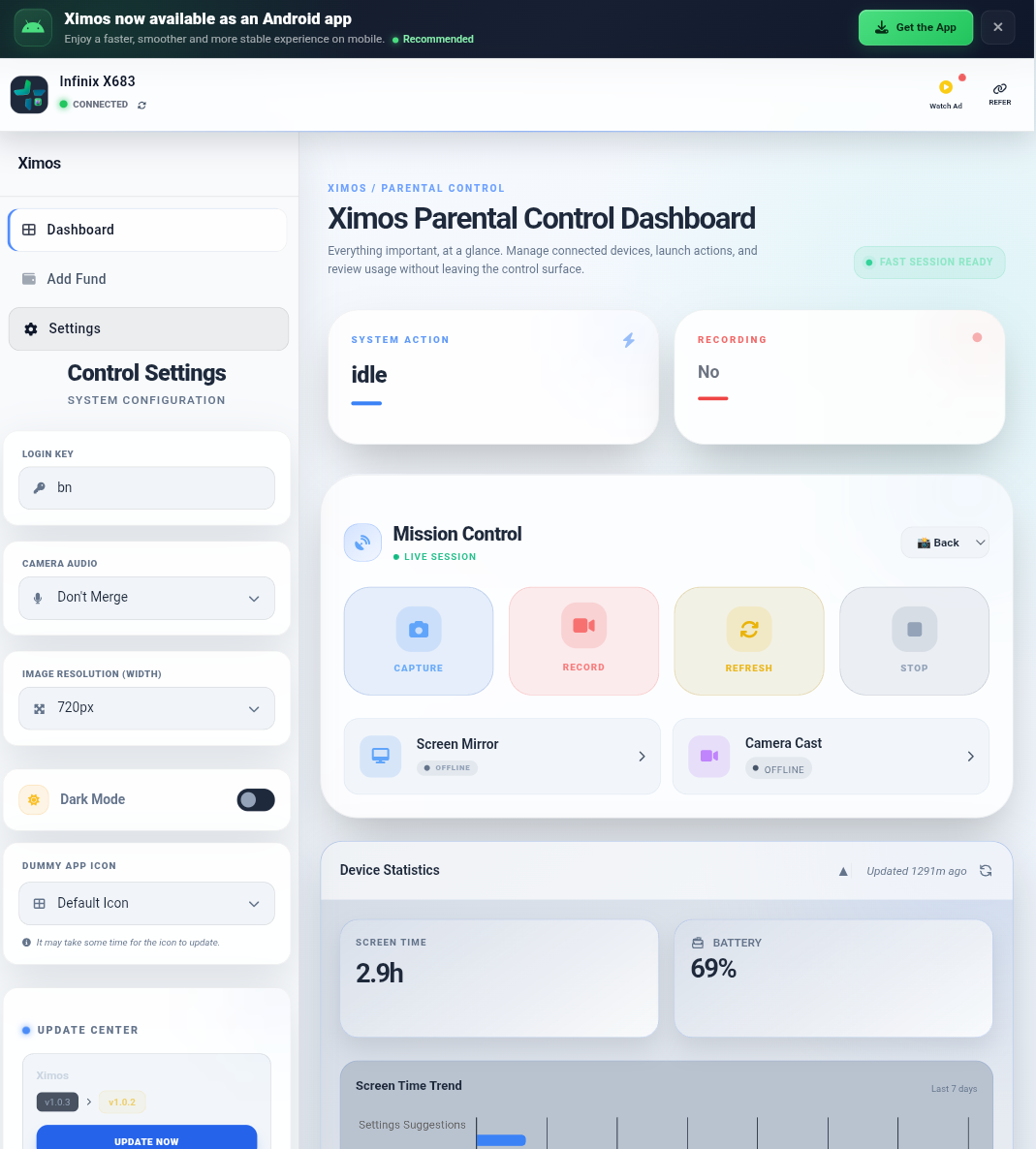
Modern parents need more than a basic screen-time counter. A useful parental control platform should help families understand device activity, respond to problems quickly, communicate with a child's device, and protect sensitive information at the same time.
Ximos Parental Control is designed around that idea.
Ximos combines a parent-side control application and web dashboard with XimosKid, the companion application installed on the supervised Android device. The result is a centralized system for authorized parental supervision, real-time device assistance, activity insights, notifications, media capture, and privacy-conscious device management.
Unlike a traditional parental control app that focuses only on app blocking or daily screen limits, Ximos puts real-time capabilities at the center of the experience. Parents can use low-latency WebRTC technology for live screen and camera sessions, send visible alerts to the connected device, review usage information, and perform authorized remote actions.
Just as importantly, Ximos is designed to remain visible on the supervised device. XimosKid operates under its own identity and maintains a persistent foreground notification while monitoring functionality is active. This makes Ximos a family-safety tool rather than a product designed around covert monitoring.
Important: Ximos is intended for authorized parental supervision and family safety. Parents should use monitoring features transparently, responsibly, and in accordance with applicable laws and the child's age and circumstances.
What Is Ximos Parental Control?
Ximos is an Android-focused parental control and remote device management ecosystem built for parents and guardians.
The ecosystem has two primary sides:
- Ximos Parent — the parent-facing application and control interface.
- XimosKid — the companion application installed on the supervised Android device.
- Ximos Web Dashboard — a browser-based control center for parents who prefer not to use the Android parent app.
The system is designed to bring device supervision, live sessions, communication tools, usage information, and safety actions into one place.
Ximos at a Glance
| Capability | Ximos |
|---|---|
| Android parental control | Yes |
| Parent web dashboard | Yes |
| Live screen mirroring | Yes |
| Remote screen interaction | Yes |
| Front/rear camera streaming | Yes |
| One-way surrounding audio | Yes |
| Photo/video capture | Yes |
| Encrypted media vault | Yes |
| App usage reporting | Yes |
| Screen-time insights | Yes |
| Unlock-count reporting | Yes |
| Cellular/Wi-Fi usage insights | Yes |
| Visible on-screen alerts | Yes |
| Image notifications | Yes |
| Remote URL actions | Yes |
| Clipboard text sharing | Yes |
| App restriction/control capabilities | Yes |
| AI-assisted dashboard summaries | Yes |
| Subscription requirement for core app | No |
| Pay-as-you-go live streaming | Yes |
Feature availability can depend on the current Ximos/XimosKid build, Android version, granted permissions, device manufacturer restrictions, and the specific feature being used.
Why Ximos Takes a Different Approach to Parental Control
Many parental control products concentrate primarily on three areas: application restrictions, web filtering, and screen-time limits.
Ximos goes further by treating the child's Android phone as a device that a parent may need to understand, communicate with, and assist remotely.
That difference becomes especially important when a parent needs to:
- see what is happening on the device in real time;
- help a child navigate something remotely;
- check a device through an authorized live camera session;
- listen to surrounding audio during an active, visible session;
- send an immediate visual warning;
- push a link or text instruction;
- review daily device usage;
- understand how frequently a phone is being unlocked;
- review captured media;
- use an AI-assisted summary instead of manually reading large amounts of telemetry.
Ximos is therefore better understood as a combination of parental control, family device management, remote assistance, and privacy-conscious monitoring.
Ximos Parental Control Features
1. Ultra-Fast Screen Mirroring with Real-Time Remote Control
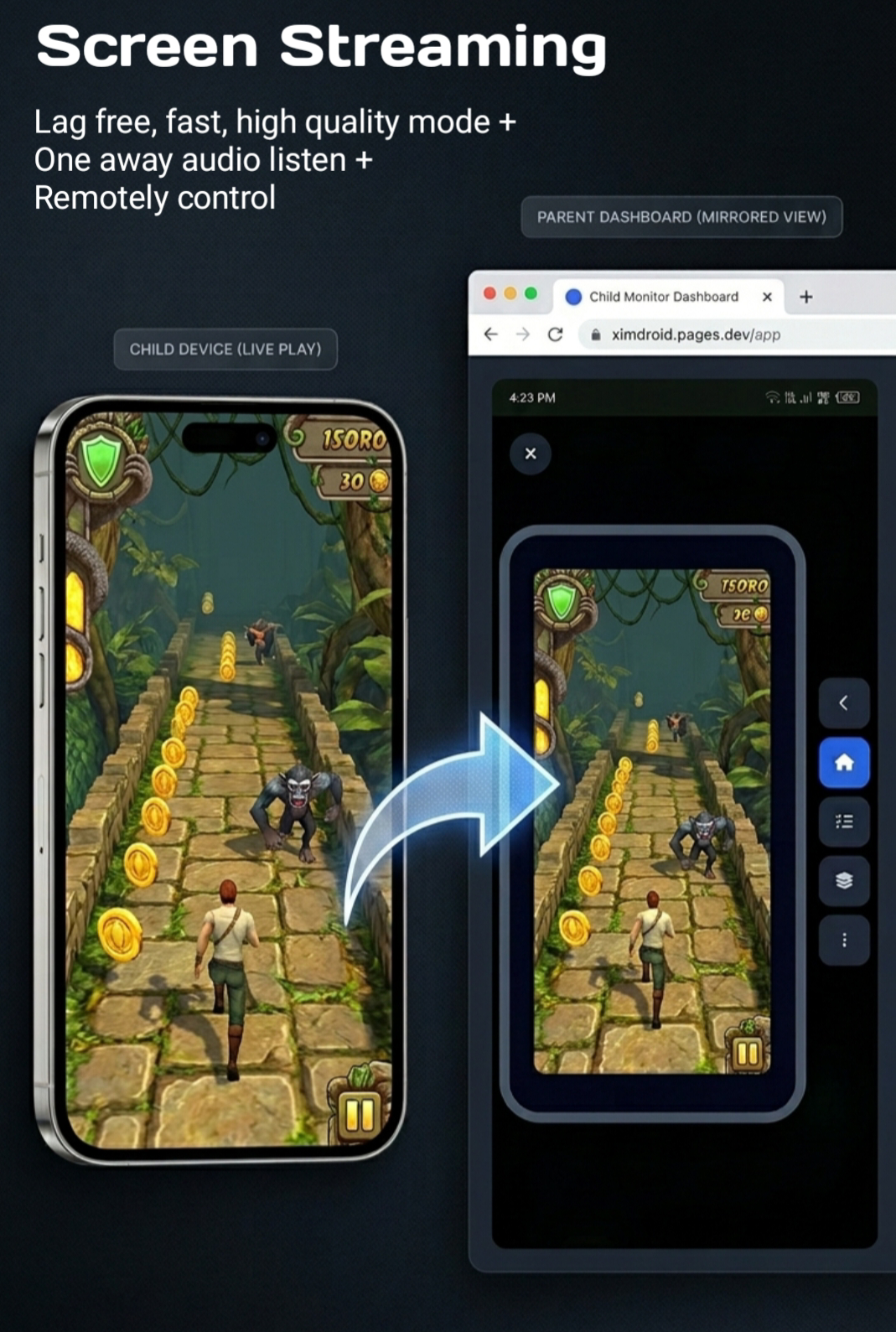
One of the most important Ximos features is real-time screen mirroring.
The child's Android screen can be streamed to the parent dashboard through an encrypted WebRTC connection designed for very low latency. Instead of producing a delayed recording or a periodically refreshed screenshot, Ximos is designed for an interactive live session.
This is useful when a parent needs to understand what is happening on the child's device right now.
Remote interaction during screen sessions
Ximos also supports authorized remote touch interaction during an active screen session.
Depending on the device and current build, remote actions can include:
- normal clicks;
- taps;
- swipes;
- long presses;
- long drawing gestures;
- other supported touch events.
This changes screen mirroring from a passive viewing tool into a remote assistance system.
For example, a parent may be able to guide a child through a setting, help locate an important application, or assist with a task without needing to physically hold the phone.
Why low latency matters
A parental control screen stream is much more useful when the parent can see an action and respond immediately.
Low-latency streaming helps reduce the frustrating gap between:
- an action happening on the child device;
- the parent seeing the action;
- the parent sending a remote interaction;
- the child device responding.
Ximos uses WebRTC-based live communication to make this interaction feel closer to a real-time device session.
2. Live Camera Access: Front and Rear Camera Streaming
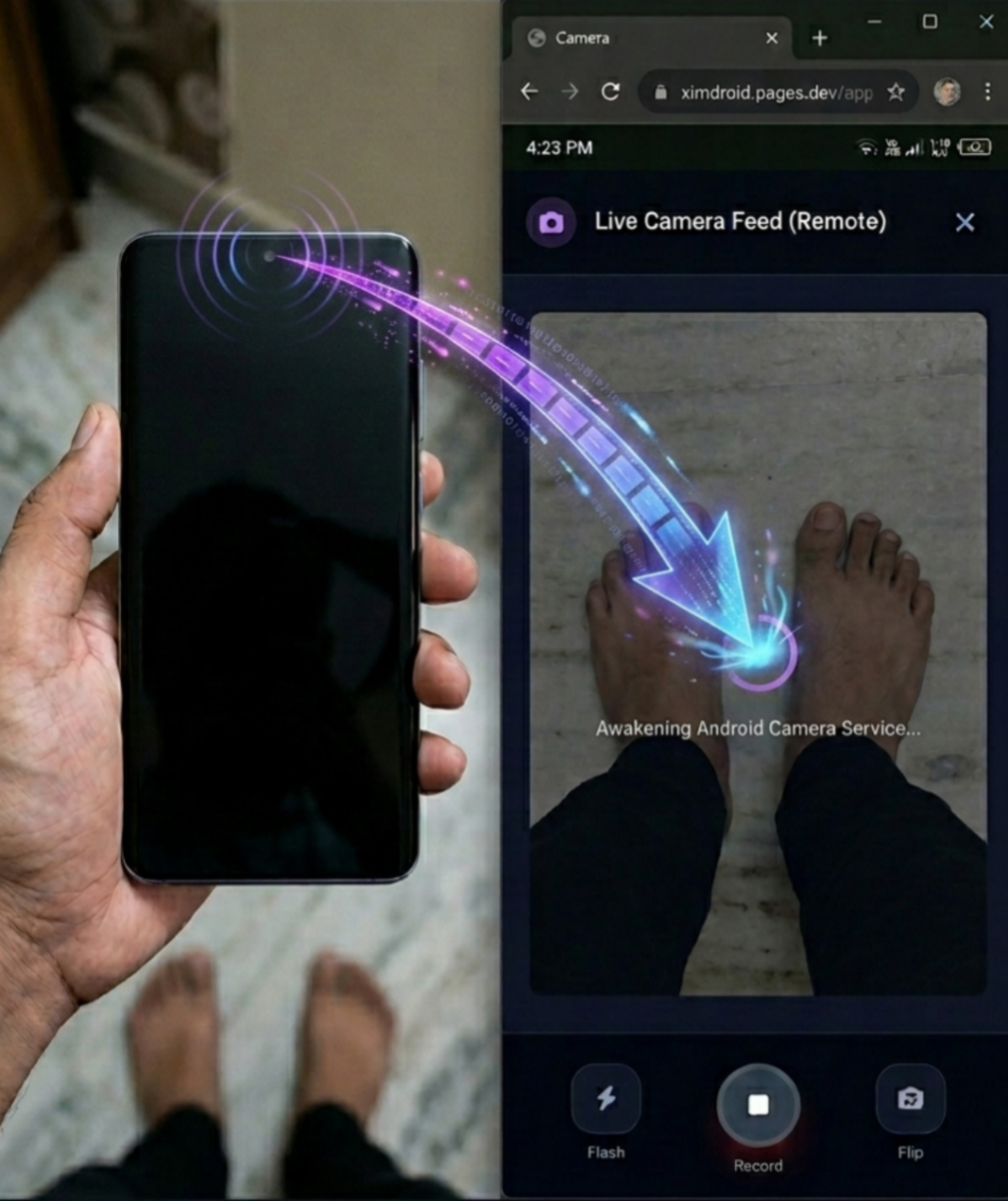
Ximos supports remote camera access through live camera sessions.
The feature is designed around both major smartphone cameras:
- Front camera
- Rear camera
The parent can switch between supported camera views during a session, making the feature more flexible than a fixed single-camera monitor.
Camera controls
The current Ximos feature set includes camera-session controls such as:
- front/rear camera switching;
- camera streaming;
- flash/torch control where supported;
- live viewing through the parent dashboard;
- optional surrounding-audio listening during eligible sessions.
This can be useful for legitimate family check-ins, device assistance, or situations where a parent needs to verify something on or around the supervised device.
Low-latency camera streaming
Ximos uses WebRTC for real-time streaming rather than relying on a traditional upload-and-download workflow.
The project targets very low interactive latency, with the practical result depending on network conditions, device hardware, Android background restrictions, and connection quality.
Balance requirement for paid live sessions
Live camera and surrounding-audio usage can consume streaming balance after available free credits have been exhausted.
Ximos uses a pay-as-you-go approach instead of forcing every family into a recurring subscription. A balance may be required for paid streaming time, and the minimum top-up is designed to be small.
Free promotional seconds should not be treated as unlimited paid-session balance.
3. One-Way Surrounding Audio Listening
Ximos also provides one-way audio listening during supported, parent-initiated sessions.
The purpose is to allow a parent to listen to nearby sound from the supervised device for a limited period.
The system is designed so that the supervised device shows an active status indicator while monitoring functionality is running.
Audio quality and latency
Low-latency audio is important because delayed audio can make a live device session difficult to understand.
Ximos uses WebRTC-based streaming for live audio, aiming for a responsive experience when network conditions permit.
A visible safety model
Ximos does not position audio listening as a covert surveillance function.
The supervised device can display a visible monitoring status, and the Trust Center documents the permission and notification model used by XimosKid.
That distinction matters: responsible parental technology should make the existence of monitoring understandable rather than pretending that monitoring is invisible.
4. Photo and Video Capture with Encrypted Cloud Storage
Ximos supports parent-requested photo and video capture from supported remote sessions.
Captured media can be synchronized to the Ximos Cloud Media Vault so that parents can review it later instead of needing to keep the live session open.
Encrypted media storage
The media workflow is designed around encrypted storage and controlled retention.
According to the current Ximos policy, cloud-vault media is subject to an automated retention lifecycle rather than being kept indefinitely.
The current public policy describes a 30-day retention period, followed by an automated deletion/trash process before permanent removal.
That means parents should treat the vault as a temporary backup rather than a permanent archive.
Why the retention policy matters
A parental monitoring system can potentially handle highly sensitive family information.
Keeping every captured image or video forever creates unnecessary privacy risk.
A time-limited vault provides a more practical model:
Capture → Encrypt → Store temporarily → Use when needed → Automatic deletion
Parents who need permanent copies should export important media before the retention period ends.
5. Location Tracking and Device Location Awareness
Location awareness is an important part of the broader Ximos safety direction.
A modern family safety platform can combine available device location signals to improve the usefulness of a location estimate, including sources such as:
- GPS;
- Wi-Fi positioning;
- mobile network information;
- nearby cellular infrastructure;
- other Android-supported location signals.
The exact accuracy of any location feature depends on the device, permissions, network environment, GPS visibility, indoor/outdoor conditions, and current Ximos build.
Feature availability should be checked against the current release before relying on location tracking for a time-critical situation.
6. Daily Screen-Time and App-Usage Insights
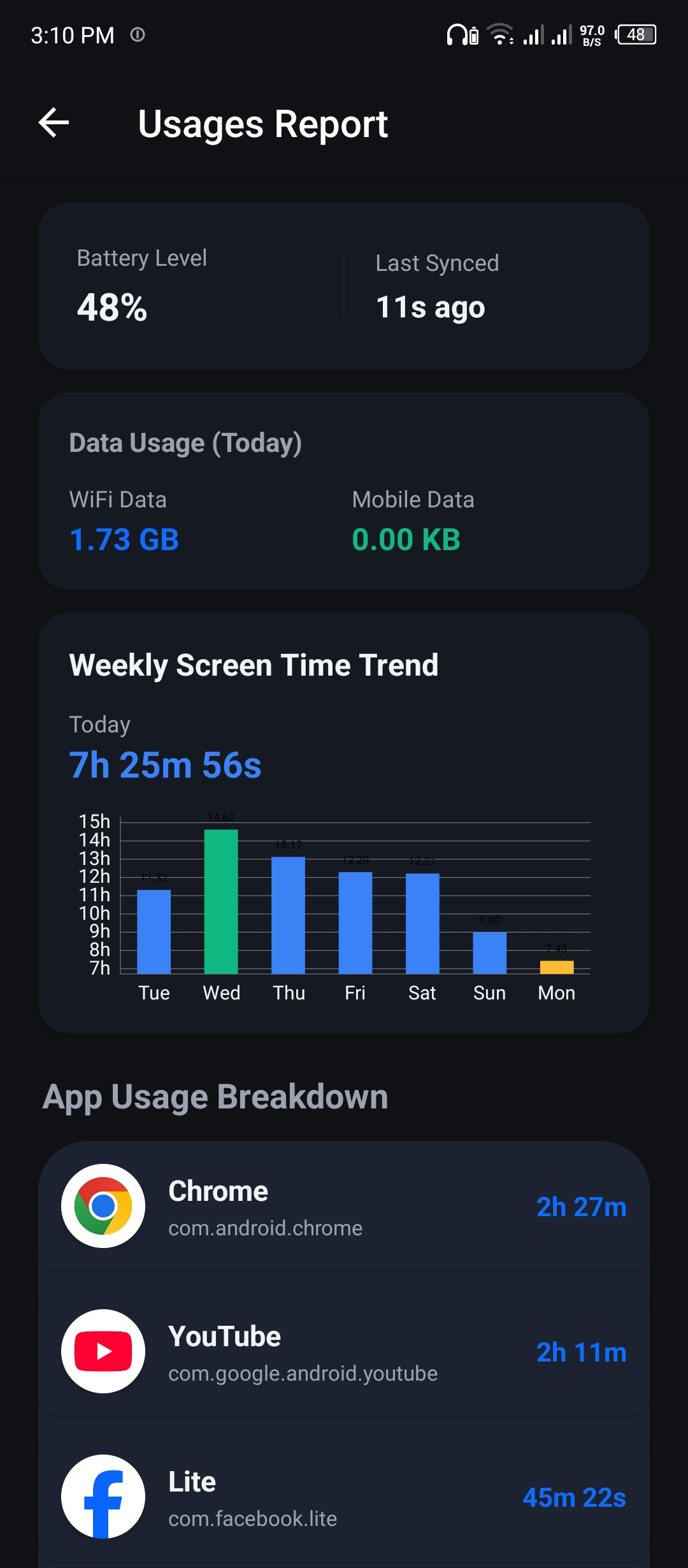
Parental control should not be limited to blocking apps.
Parents also need to understand how a child actually uses a device.
Ximos provides usage information that can help answer questions such as:
- How much time was the phone used today?
- Which applications were used most?
- Which applications consumed the most time?
- What does the daily usage pattern look like?
- Is a particular application becoming disproportionately important?
The information can be reviewed through the Ximos parent interface or web dashboard where supported.
Usage monitoring without reading private app content
A major distinction in Ximos's architecture is the difference between usage metadata and private in-app content.
Ximos can use Android usage-access capabilities to understand application usage time.
That does not mean Ximos needs to read everything displayed inside every application.
In other words:
App usage reporting ≠ reading the contents of every app.
This distinction is central to a privacy-first parental control design.
7. Daily Cellular and Wi-Fi Data Usage
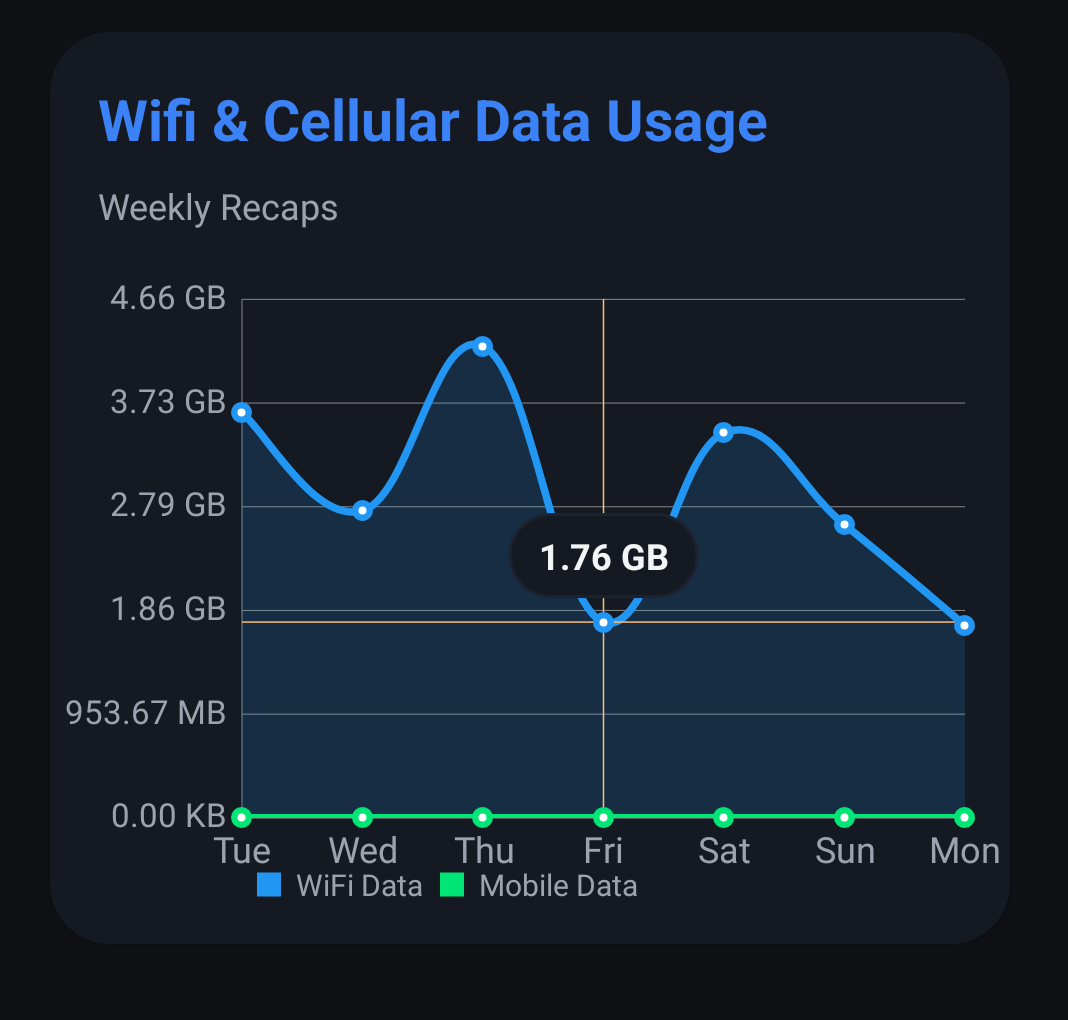
Mobile data can become expensive, especially when a child frequently streams video, downloads large files, or uses data-heavy applications.
Ximos can provide device-level network usage information so parents can understand daily consumption patterns.
This can help answer:
- How much cellular data is being used?
- How much network activity occurs over Wi-Fi?
- Is data usage unusually high?
- Does the child's usage pattern explain an unexpectedly large data bill?
Instead of guessing why a data plan is being consumed quickly, parents can use usage telemetry to identify trends.
8. Daily Phone Unlock Count
Screen time tells only part of the story.
Another useful behavioral signal is how frequently a phone is unlocked.
Ximos can expose daily unlock information so parents can see how often the device is being accessed.
For example, a parent might discover that a phone is being checked repeatedly throughout the day even when total screen time does not appear unusually high.
Unlock frequency can therefore provide another context signal alongside:
- screen time;
- application usage;
- network consumption;
- battery information;
- device activity.
These signals are most useful when interpreted together rather than treated as isolated judgments.
9. Full-Screen and Overlay Alert Windows
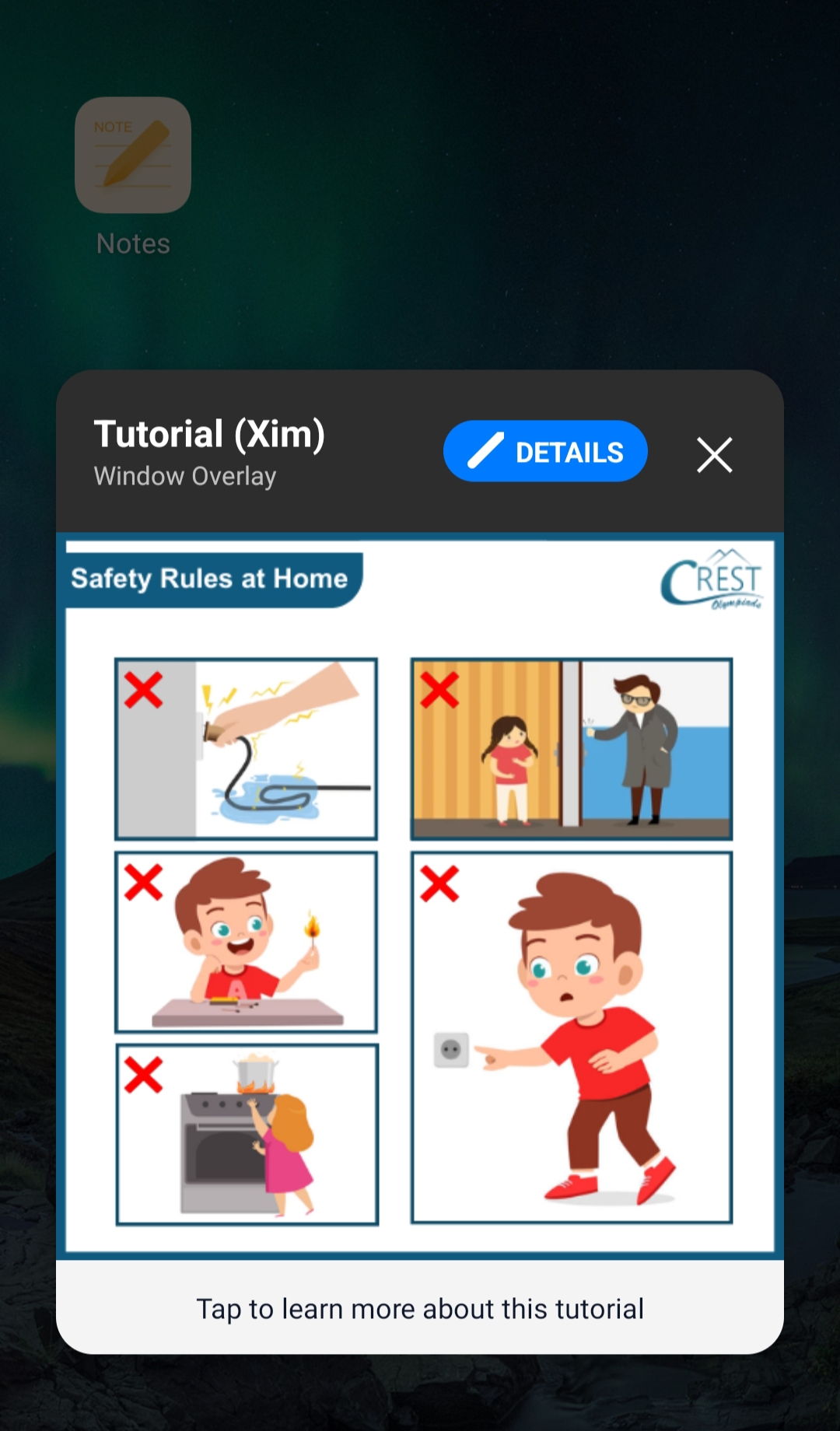
Sometimes a normal notification is not enough.
Ximos supports on-screen overlay and priority alert capabilities that can display a visible message over the child's active screen.
A parent can use a visual alert for situations such as:
- an important reminder;
- a study instruction;
- a family safety message;
- a time-sensitive warning;
- an emergency-style priority notice.
The goal is to make the message visible without requiring the child to open another application.
Why overlay alerts are useful
A conventional notification can be ignored or missed.
An on-screen alert can communicate more directly when the message is important.
The Trust Center and permission documentation explain that overlay access is used for safety-related UI functions rather than for injecting advertising or disguising unrelated interfaces.
10. Real-Time On-Screen Notifications with Images
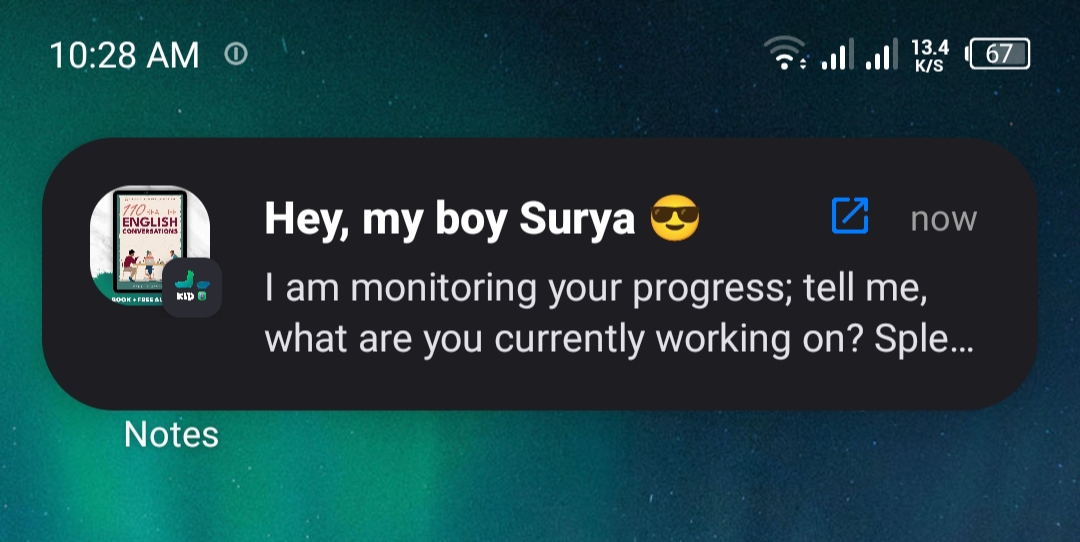
Ximos can send visible notifications to the supervised device.
These notifications can include:
- a title;
- a message;
- an optional image;
- an optional action link.
This makes the notification system more flexible than a simple text-only alert.
A parent could use it to send a visual reminder, an instruction, or a family message directly to the connected device.
Because the message is designed to appear on the child's device, it can be used for communication without requiring a phone call or separate messaging platform.
11. Send and Open Links on the Child Device
Ximos can send a URL to the connected device and request that the device open it using the supported browser workflow.
This can be useful for sending:
- school resources;
- homework links;
- family schedules;
- educational websites;
- safety information;
- useful web pages.
Safety-aware URL handling
A remote URL feature should not be treated as a guarantee that every destination on the internet is safe.
Links should be checked before they are sent, and parents should use trusted destinations whenever possible.
Ximos can provide a convenient way to send a link, but safe browsing still depends on the destination, browser security, device configuration, and the family's rules.
12. One-Click Clipboard Sharing
Sometimes the fastest way to communicate something is simply to copy it.
Ximos supports clipboard-based text sharing so a parent can send text content to the connected device with minimal friction.
Possible uses include:
- a short instruction;
- an address;
- a search phrase;
- a temporary note;
- a school-related text;
- a link;
- a code or non-sensitive reference string.
Clipboard sharing is particularly useful when typing a long message on the child device would be inconvenient.
Parents should still avoid sending sensitive credentials or confidential information through any shared clipboard workflow unless they understand the security implications.
13. App Restriction and Harmful-Content Protection
Parental control is not complete without protective controls.
Ximos supports Android device-management capabilities that can help parents restrict or manage applications and safety-related access.
The underlying Android accessibility and usage capabilities are intended for authorized parental-control functions, such as remote assistance, application restriction, and usage reporting.
A different privacy philosophy
Ximos does not need to become a universal reader of every application's internal content just to provide useful parental controls.
There is an important difference between:
Controlling or measuring an application
and
Reading everything inside that application.
The Ximos architecture emphasizes device-level management and usage information rather than turning the parental control system into a universal content scraper.
Where specific adult-content or harmful-content filtering capabilities are enabled, the exact behavior should be checked against the current Ximos release and device configuration.
14. AI-Powered Dashboard Summaries
Modern parental control dashboards can collect a lot of information.
The problem is that data is not automatically insight.
Ximos's AI-assisted dashboard approach is intended to help parents turn device telemetry into an easier-to-understand summary.
Instead of manually checking every metric, an AI-powered summary can help surface patterns such as:
- unusual usage changes;
- frequently used applications;
- high data consumption;
- changes in device activity;
- notable daily trends;
- important dashboard events.
Why AI summaries matter
Parents do not necessarily need more charts.
They need clearer answers.
An effective AI summary should transform:
Raw telemetry → Context → Understandable explanation → Possible next action
This is especially valuable when several device metrics need to be interpreted together.
15. Ximos Does Not Need to Read Every App's Private Content
One of the most important ideas behind Ximos is that parental control does not have to mean unrestricted access to the internal content of every application.
Ximos can provide useful supervision using signals such as:
- application usage time;
- screen activity;
- device status;
- network usage;
- unlock activity;
- authorized screen sessions;
- authorized camera sessions;
- parent-generated notifications;
- supported device-management actions.
This is fundamentally different from designing the system around automatic reading of private messages, passwords, or arbitrary application databases.
That distinction can reduce unnecessary data collection while still giving parents meaningful safety information.
16. Privacy-First Architecture and Encrypted Live Sessions
Security is not an optional feature for parental control.
A platform that handles camera, microphone, screen, and family activity data must carefully consider:
- transport security;
- access control;
- permission boundaries;
- retention;
- account security;
- device visibility;
- data minimization.
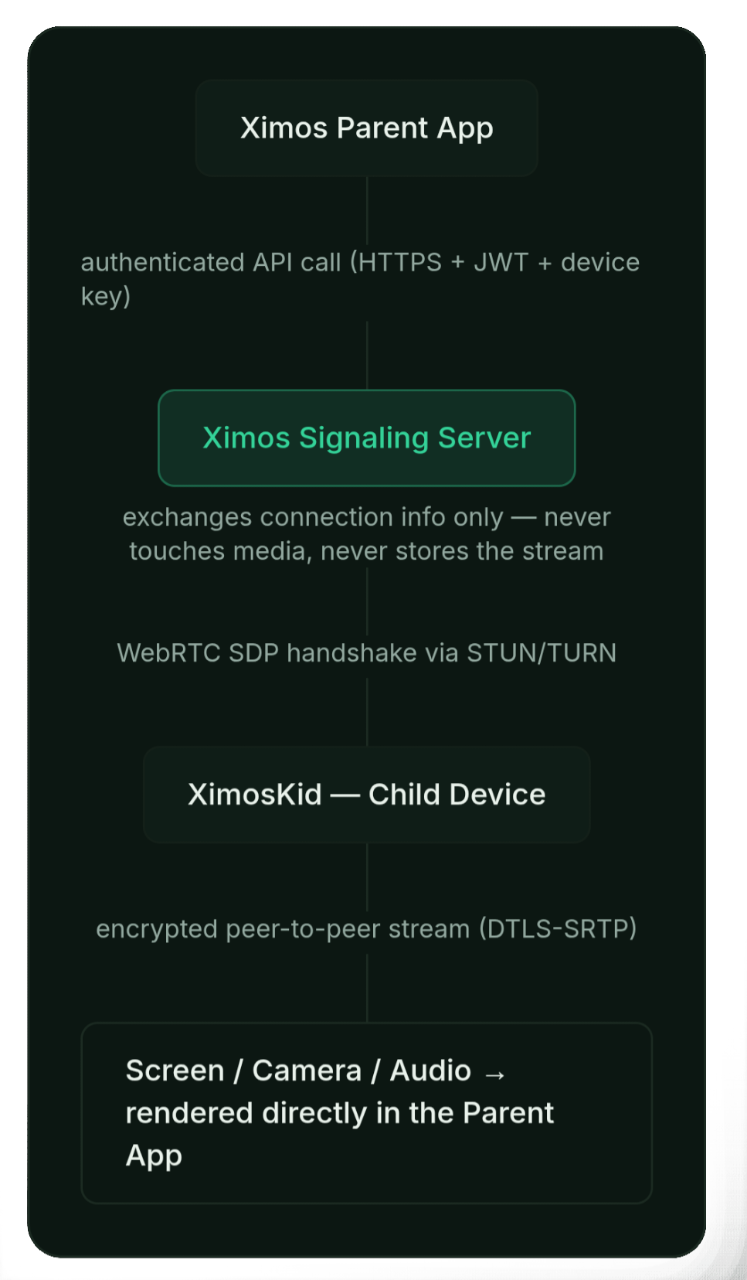
Ximos uses WebRTC-based encrypted transport for live screen, camera, and audio sessions.
The public Ximos documentation also describes a minimal server-side identity model and a separation between transient live streaming and cloud-vault media.
Transient live streams vs. cloud media
These are two different data paths.
Live session:
Child device → encrypted live connection → Parent dashboard → session ends → live stream is not retained as ordinary server media
Cloud vault:
Parent-requested capture → encrypted cloud storage → temporary retention period → automated deletion lifecycle
This distinction is important because the phrase "zero storage" should not be interpreted as "nothing is ever stored anywhere."
Ximos's current public documentation describes no ordinary server-side retention for live streams after the session, while separately documenting a temporary cloud-vault retention period for captured media.
That is a much clearer way to understand the architecture.
17. Visible Monitoring Instead of Covert Monitoring
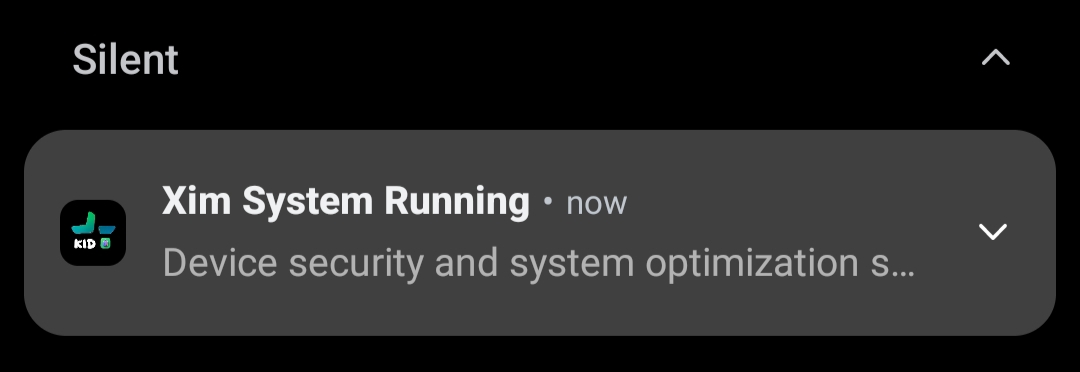
A responsible parental control system should not pretend that monitoring does not exist.
XimosKid is designed to remain identifiable on the supervised device.
The current Ximos trust documentation describes:
- the XimosKid name and identity;
- a persistent foreground notification while monitoring services are active;
- visible status indicators for active streaming/listening sessions;
- permission disclosures before sensitive Android permissions are granted.
This is an important part of the Ximos safety model.
Parents should still have an age-appropriate conversation with children about device supervision. Technology can support family safety, but it should not replace trust, communication, or responsible parenting.
18. Minimal Permission Philosophy
Ximos documents why its Android permissions are required.
Examples include:
Camera permission
Used for authorized remote camera sessions and supported capture functions.
Microphone permission
Used for authorized surrounding-audio listening and supported audio functionality.
Accessibility service
Used for supported remote touch interaction and device-management functionality.
Overlay permission
Used for priority alerts, on-screen notices, and supported remote-control overlays.
Usage access
Used for application usage-time reporting and related device activity insights.
Notification permission
Used for visible monitoring notifications and parent-to-child notification functionality.
This permission-specific approach makes it easier for users to understand what the application needs and why.
19. Open-Source Transparency
Another notable part of the Ximos ecosystem is its public development and release repository.
The official Ximos release repository provides access to project information, release materials, architecture details, and Android builds.
Open-source and publicly documented components can make it easier for developers, technically minded parents, and security researchers to inspect how a product is designed.
Transparency does not automatically make software secure, but it creates a stronger basis for inspection and accountability.
20. Ximos Web Dashboard: Manage Everything from a Browser
Parents do not always want another Android application.
That is why Ximos provides a web-based control dashboard.
From the browser-based interface, parents can access supported controls such as:
- connected-device management;
- screen mirroring;
- camera sessions;
- media capture;
- notifications;
- visual notices;
- URL actions;
- clipboard actions;
- device activity information.
A web dashboard is especially useful when the parent is working from a computer or another device.
21. Pay-As-You-Go Instead of a Traditional Subscription
One of Ximos's biggest product differences is its billing model.
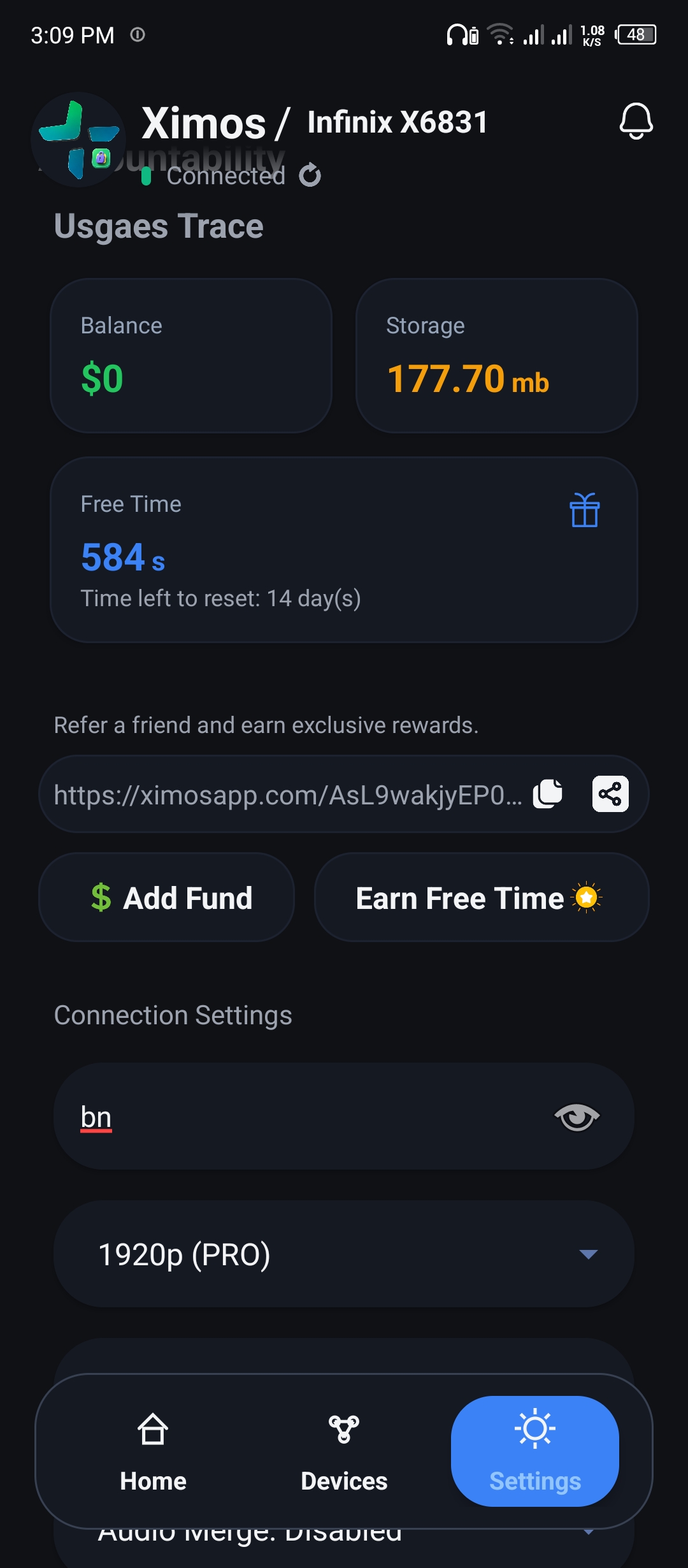
Instead of requiring every family to pay a recurring monthly subscription simply to keep an account active, Ximos uses a pay-as-you-go approach for live streaming usage. Most important you can use ximos for free unlimited. Account create bonus 720s and refer bonus bonus 420-680s. Canera cast, Screen cast And One away surrounding audio listening is limited (Free second or balance needed) but rather all features are available for use unlimited. There no limitations on other features. That's a great advantage.
The current public product information describes:
- free streaming credits for new accounts;
- periodic free-credit resets;
- additional reward opportunities;
- referral-based bonus credits;
- optional balance top-ups;
- usage-based charging for supported live sessions.
This model is particularly useful for parents who only need live monitoring occasionally.
The practical difference
A subscription model can charge for an entire period even when a family barely uses the service.
A usage-based model can be more appropriate when the requirement is occasional:
"I only need a live session when I actually need it."
At the same time, parents should understand that live camera, screen, and audio streaming are usage-based features and may consume balance after free credits are exhausted.
The core Ximos application and many management features are designed to remain accessible without a conventional recurring subscription.
22. Free Core Features and Unlimited Everyday Management
Ximos is designed to make everyday parental device management accessible without forcing a recurring subscription.
Parents can use the platform for device oversight and management without paying a monthly fee simply to maintain access to the core ecosystem.
The important distinction is between core management and live resource-intensive streaming.
How to use Streaming features(Screen, Camera, Audio Cast) for free unlimited?
It very easy. When you are out of free seconds, you can go "w1.ximosapp.com" and watch ads or complete Simple tasks and earn credit. After earn some credit, click Redeem button on the site page. Then it will be convert your earned credit to free seconds. There no limitations to earn or convert credit. Enjoy. 1 Credit = 5-20 second. If you are from United States then the credit value will increase so much (15-50 second each credit).
Generally free core capabilities
Depending on the current build, free management capabilities can include:
- dashboard access;
- device management;
- usage information;
- screen-time insights;
- app-usage information;
- device telemetry;
- notifications;
- URL actions;
- clipboard actions;
- supported safety controls;
- other non-streaming parental management tools.
Usage-based live capabilities
Streaming features such as:
- screen mirroring;
- camera casting;
- surrounding audio;
can consume streaming credits or paid balance.
This hybrid model lets Ximos keep the everyday parental-control experience accessible while charging according to actual use of bandwidth-intensive live features.
23. Ximos Is More Than an App Blocker
A simple parental control application can answer:
"Which apps are blocked?"
Ximos is designed to answer a much broader set of questions:
What is happening on the device?
How is the device being used?
Can I assist remotely?
Can I communicate with the device immediately?
Can I understand the activity without reading every private message?
Can I access live tools when I genuinely need them?
Can sensitive live data avoid permanent server-side retention?
This broader model is what makes Ximos interesting for families looking for a modern Android parental control platform.
24. Ximos Feature Categories at a Glance
Live Monitoring
- Ultra-low-latency screen mirroring
- Remote screen interaction
- Front camera streaming
- Rear camera streaming
- Camera switching
- Flash/torch control where supported
- One-way surrounding audio
- Live session status indicators
Media
- Remote photo capture
- Remote video capture
- Encrypted cloud media vault
- Temporary retention lifecycle
- Media review and export
Device Insights
- Daily screen-time information
- App usage statistics
- Frequently used apps
- Cellular data usage
- Wi-Fi usage
- Phone unlock count
- Battery and device status where supported
Remote Communication
- On-screen notifications
- Image notifications
- Priority overlay alerts
- Parent notes
- URL actions
- Clipboard sharing
Parental Safety
- Application management
- App restriction capabilities
- Safety-oriented overlay controls
- Permission-aware monitoring
- Visible monitoring status
Security and Privacy
- Encrypted WebRTC transport
- Minimal server-side identity data
- Temporary cloud-vault retention
- Automated deletion
- Permission disclosures
- Persistent foreground notification
- Public technical documentation
- Public release repository
AI
- Dashboard data summaries
- Activity interpretation
- Pattern-oriented insights
- Easier understanding of large telemetry sets
25. How Ximos Compares with Traditional Parental Control Apps
Traditional parental control products often focus heavily on:
- screen limits;
- application blocking;
- web filtering;
- location;
- reports.
Those capabilities are useful, but modern parents can need something more interactive.
Ximos adds a real-time device-management layer around those concepts.
| Area | Traditional Parental Control | Ximos Approach |
|---|---|---|
| Screen time | Common | Yes |
| App usage | Common | Yes |
| App restrictions | Common | Yes |
| Live screen view | Less common | Yes |
| Remote touch assistance | Less common | Yes |
| Live front/rear camera | Less common | Yes |
| One-way audio | Less common | Yes |
| Image-based alerts | Varies | Yes |
| Clipboard actions | Rare | Yes |
| URL actions | Varies | Yes |
| Device unlock metrics | Varies | Yes |
| Network usage insights | Varies | Yes |
| AI summaries | Emerging | Yes |
| Browser dashboard | Varies | Yes |
| Usage-based live streaming | Uncommon | Yes |
| Visible monitoring presence | Varies | Yes |
| Public technical documentation | Varies | Yes |
The key difference is not that every traditional parental-control feature is missing elsewhere.
The difference is that Ximos attempts to combine everyday parental management with real-time remote device capabilities in one ecosystem.
26. Who Is Ximos Best For?
Ximos can be useful for parents and guardians who want:
Real-time visibility
Parents who want the option to view a child's screen or use an authorized live camera session when necessary.
Remote assistance
Families that sometimes need to guide a child through an Android task remotely.
Usage awareness
Parents who want more than a simple "screen time" number and prefer application-level usage and device telemetry.
Privacy-conscious monitoring
Families that do not want a parental-control platform to unnecessarily collect and retain every piece of private application content.
Flexible pricing
Parents who dislike paying a recurring subscription for a service they only occasionally use.
Centralized control
Parents who want both a mobile parent interface and a browser dashboard.
27. What Ximos Does Not Try to Be
Ximos is not designed as:
- a covert stalkerware product;
- a hidden spyware tool;
- a universal private-message reader;
- an invisible monitoring system;
- a permanent media archive.
The product's public trust documentation emphasizes visibility, permission disclosures, minimal data collection, and authorized parental use.
This is important because parental control technology sits close to a sensitive boundary.
The objective should be child safety and responsible supervision, not secret surveillance.
28. A Privacy Model Built Around Data Minimization
A strong parental-control product should ask a simple question:
Do we really need to collect this data to provide the feature?
Ximos's architecture attempts to separate the information required for device management from information that does not need to be permanently retained.
For live sessions, the goal is transient encrypted communication rather than turning every screen, camera, and audio session into a permanent server archive.
For captured media, the cloud vault provides temporary storage with an automated deletion lifecycle.
For application usage, the platform can use usage metadata rather than requiring access to the internal contents of every application.
This is a more focused approach to family device management.
29. Ximos Security and Trust Resources
Parents who want to understand the technical side of Ximos should review the project's official documentation rather than relying only on marketing descriptions.
Useful resources include:
- Ximos official website: https://ximosapp.com/
- Ximos web dashboard: https://ximosapp.com/app
- Ximos technical documentation: https://ximosapp.com/uno/docs
- Ximos Trust Center: https://ximosapp.com/uno/trust
- Ximos on SourceForge: https://sourceforge.net/software/product/Ximos-Parental-Control/
- Ximos on Apkpure: https://apkpure.com/p/com.ximexa.ximos
- Official Ximos/XimosKid release repository: https://github.com/ximexa/ximos-offical-releases
- Ximos Trust Pilot: https://www.trustpilot.com/review/ximosapp.com
These pages provide additional information about releases, permissions, architecture, privacy, and product updates.
30. Getting Started with Ximos
Getting started is designed around the two-device model.
Step 1: Set up the parent side
Install or open the Ximos parent interface and create or access the parent account.
Step 2: Install XimosKid on the supervised Android device
Install the current XimosKid release on the child's Android phone.
Step 3: Review permissions
XimosKid requests the permissions required for the functions you want to use.
Parents should read each permission explanation carefully before enabling it.
Step 4: Pair the devices
Use the supported Ximos pairing process to connect the parent account with the supervised device.
Step 5: Configure family rules
Decide which features are appropriate for your family.
For example:
- screen-time expectations;
- application rules;
- notification preferences;
- live-session rules;
- media retention habits;
- communication expectations.
Step 6: Use monitoring responsibly
Explain to the child what the system does and why it is installed.
The best parental-control system is not simply the one with the most features.
It is the one that supports safety while preserving an appropriate level of trust and privacy.
31. Frequently Asked Questions About Ximos Parental Control
Is Ximos a parental control app for Android?
Yes. Ximos is an Android-focused parental control and family device-management ecosystem consisting of a parent-side control interface and the XimosKid companion application.
What is XimosKid?
XimosKid is the companion application installed on the supervised Android device. It provides the device-side functionality required for supported live sessions, telemetry, notifications, and parental-control actions.
Can Ximos mirror a child's Android screen?
Yes. Ximos supports live screen mirroring through WebRTC-based streaming.
Can parents remotely control the child's screen?
Supported screen sessions can include remote touch interaction such as taps, clicks, swipes, and other supported gestures.
Does Ximos support front and rear camera access?
Yes. Ximos supports live front and rear camera streaming on compatible Android devices, with camera switching during supported sessions.
Can Ximos listen to surrounding audio?
Ximos supports one-way surrounding-audio listening during authorized, parent-initiated sessions. The supervised device is designed to show an active monitoring state.
Does Ximos record everything continuously?
No. Ximos is designed around active, authorized sessions rather than continuous covert recording.
Does Ximos read everything inside other apps?
Ximos's usage-monitoring model is based on device and application usage information rather than requiring unrestricted access to the internal content of every application.
Does Ximos store live screen, camera, and audio streams permanently?
The current architecture is designed so that live streams are transient and are not retained as ordinary server-side media after the session ends. Captured media intentionally placed in the cloud vault follows a separate temporary retention policy.
How long does captured cloud media remain available?
The current public policy describes a 30-day cloud-vault retention lifecycle followed by automated deletion processing.
Does Ximos require a monthly subscription?
Ximos does not use a traditional mandatory monthly subscription for its core ecosystem. Live streaming uses a usage-based balance model after available free credits are exhausted.
Are Ximos screen and camera features completely free forever?
The core application can be used without a recurring subscription, but live screen, camera, and audio sessions can consume free credits or paid balance. Users should check the current billing terms before relying on live streaming without a balance.
Does Ximos have a web dashboard?
Yes. Parents can use the Ximos web control dashboard from a browser.
Can Ximos send notifications to a child's phone?
Yes. Ximos supports visible parent-to-child notifications and on-screen notices, including image-supported notification workflows where supported.
Can Ximos send a URL to the child's device?
Yes. Ximos provides a supported URL action that can request the device's browser to open a supplied link.
Can Ximos send text through the clipboard?
Yes. Ximos supports clipboard-based text sharing for supported parent-to-child workflows.
Can parents see app usage?
Yes. Ximos can provide application usage and screen-time information through supported device telemetry.
Can parents see phone unlock counts?
Yes. Supported telemetry includes device unlock information.
Can parents see mobile and Wi-Fi data usage?
Ximos provides supported network and data-usage information so parents can understand device connectivity and consumption patterns.
Does Ximos support app restrictions?
Ximos includes Android device-management capabilities for supported application restriction and parental-control workflows. Exact controls can vary by Android version and device.
Is Ximos open source?
The Ximos project publishes official release and technical materials through a public repository. The exact scope of open-source components should be checked in the repository and current release documentation.
Is XimosKid visible on the child's device?
Yes. The current trust model describes XimosKid operating under its own identity and maintaining a foreground notification while monitoring functionality is active.
Is Ximos designed for secret surveillance?
No. Ximos is designed and documented as an authorized parental safety and device-management system, not as covert stalkerware.
32. Final Verdict: Why Ximos Is Different
Ximos is built around a simple but powerful idea:
Parents should be able to understand and assist with a child's digital life without automatically turning every piece of private data into permanent surveillance data.
Its feature set combines capabilities that are often separated across multiple products:
- live screen mirroring;
- remote touch interaction;
- front and rear camera streaming;
- one-way surrounding audio;
- photo and video capture;
- encrypted cloud media storage;
- screen-time insights;
- app-usage reporting;
- network-usage information;
- phone unlock statistics;
- visible overlay alerts;
- image notifications;
- URL actions;
- clipboard sharing;
- application management;
- AI-assisted activity summaries;
- browser-based parental control;
- documented permissions;
- visible monitoring presence;
- usage-based live streaming;
- and a privacy-focused data-retention model.
The biggest advantage of Ximos is therefore not a single feature.
It is the combination of real-time control, everyday parental insights, flexible access, and privacy-aware architecture.
For families using Android devices, that combination can make Ximos a compelling alternative to parental-control products that focus only on app blocking and screen-time limits.
As with any parental-control technology, the strongest results come from combining technical safeguards with communication, clear family rules, and age-appropriate transparency.
Explore Ximos
Official Website: https://ximosapp.com/
Web Dashboard: https://ximosapp.com/app
Technical Docs: https://ximosapp.com/uno/docs
Trust Center: https://ximosapp.com/uno/trust
Privacy & Legal: https://ximosapp.com/uno/
Official Blog: https://blog.ximosapp.com/
Official Release Repository: https://github.com/ximexa/ximos-offical-releases
Product Hunt: https://www.producthunt.com/products/ximos-parental-control?launch=ximos-parental-control
Leave a Comment
Comments
Loading comments...